How to build an accurate cart checker workflow for Etsy ROI
Discover how to create an effective cart checker workflow for Etsy to accurately track your ROI and maximize ad profits. Don't miss out!

Running Etsy ads without reliable conversion tracking is like adjusting a budget based on foot traffic instead of actual sales. You see clicks coming in, your CTR looks reasonable, and yet you can't confirm whether those visitors are actually buying anything. This is a problem that affects a large share of Etsy sellers running paid campaigns on Facebook, TikTok, or Google Ads. A structured cart checker workflow solves that problem by connecting ad click data to add-to-cart signals and final purchase records, giving you a clear, accountable picture of where your ad dollars are going and whether they're generating real profit.
Table of Contents
- Why standard Etsy ad tracking falls short
- Cart checker workflow: Tools and data you need
- Step-by-step: Setting up your Etsy cart checker loop
- Interpreting results: What success and failure look like
- Why most Etsy sellers miss out on reliable ad ROI
- Streamline your Etsy cart checker with IndiePixel
- Frequently asked questions
Key Takeaways
| Point | Details | | --- | --- | | Clicks aren’t conversions | Tracking only ad clicks won’t reveal which campaigns are actually profitable on Etsy. | | Cart checker workflow | Link ad traffic, add-to-cart data, and orders for clear ROI calculations. | | Validate before scaling | Only scale ads with proven in-cart and order data that exceed your breakeven ROAS. | | Account for actual profit | Include marketplace fees and profit margins—not just top-line revenue—in your ad ROI analysis. |
Why standard Etsy ad tracking falls short
Before you can optimize, you need to understand why Etsy's native tracking can lead you astray.
Etsy's built-in ad dashboard gives you surface-level metrics: impressions, clicks, and click-through rate. These numbers tell you whether your listing is visible and whether shoppers are curious enough to click. But curiosity is not the same as intent, and intent is not the same as profit.
The core problem is that tracking conversions on Etsy from external ad platforms involves a significant data gap. Etsy does not allow you to install tracking pixels directly on your store pages. This means when a Facebook or TikTok ad drives a visitor to your listing, the ad platform doesn't receive a confirmed purchase signal. You're left reconciling your Etsy order export against ad platform data manually, and most sellers skip that step entirely.
The three funnel stages you need to measure separately:
- Clicks (top of funnel): Indicates interest and ad relevance. High CTR does not confirm buying intent.
- Add-to-cart (mid-funnel): Demonstrates that a shopper evaluated your product seriously. This is your intent validation layer.
- Purchases and ROAS (bottom of funnel): The only metrics that confirm profitability. Anything above this layer is diagnostic, not conclusive.
"When evaluating performance, separate funnel stages: treat CTR/clicks as top-of-funnel diagnosis, add-to-cart as intent validation, and purchases/ROAS as profitability confirmation."
Many sellers also make the mistake of optimizing on Etsy ROAS benchmarks without accounting for the full cost structure of their business. Etsy transaction fees, listing fees, payment processing charges, and the cost of goods sold all reduce actual profit. A ROAS of 3x sounds strong, but it may still represent a loss once you factor in a 45% total cost margin. Clicks are not the enemy. Incomplete data is.
Cart checker workflow: Tools and data you need
Now that you know standard metrics aren't enough, here's what you'll need to build a workflow that goes deeper.
The foundation of a cart checker workflow is a decision loop using in-carts data to move from ad traffic, through intent signals, to confirmed sales. According to the workflow mechanics outlined for Etsy attribution, you should build a cart checker loop that uses ad-driven traffic attribution by time and product, Etsy in-cart movement as intent validation, and order exports to close the loop on purchases and ROAS.
Here is what you need to gather before setting up your workflow:
Data sources:
- Timestamped ad click records from your ad platform (Facebook Ads Manager, TikTok Ads, Google Ads)
- Etsy listing-level traffic reports, broken down by date
- In-cart count snapshots for each listing you're advertising
- Etsy order exports in CSV format, including listing IDs, sale amounts, and transaction dates
- Your product-level cost of goods, Etsy fee rates, and target profit margin
Tools and setup requirements:
| Tool or Resource | Purpose | Source | |---|---|---| | Ad platform export | Timestamped click data per listing URL | Facebook, TikTok, or Google Ads | | Etsy stats export | Traffic by listing, date range | Etsy Seller Dashboard | | In-cart count tracker | Intent validation signal per listing | IndiePixel cart checker | | Order export (CSV) | Actual purchase records with timestamps | Etsy Shop Manager | | Attribution spreadsheet | Reconciliation of clicks, carts, and purchases | Custom or template-based |
Accurate timestamps are critical throughout this process. Attribution windows on most ad platforms default to seven days for click-based conversions, meaning a purchase made up to seven days after an ad click is counted as a conversion. If your timestamps in Etsy's order export and your ad platform click log aren't aligned to the same time zone, you'll mismatch conversions and get unreliable attribution data.

Pro Tip: Export your Etsy data and your ad platform data in UTC to avoid time zone discrepancies. This is one of the most common sources of reconciliation errors in manual cart checker workflows.
Step-by-step: Setting up your Etsy cart checker loop
With requirements in hand, let's map out the cart checker workflow process in actionable steps.
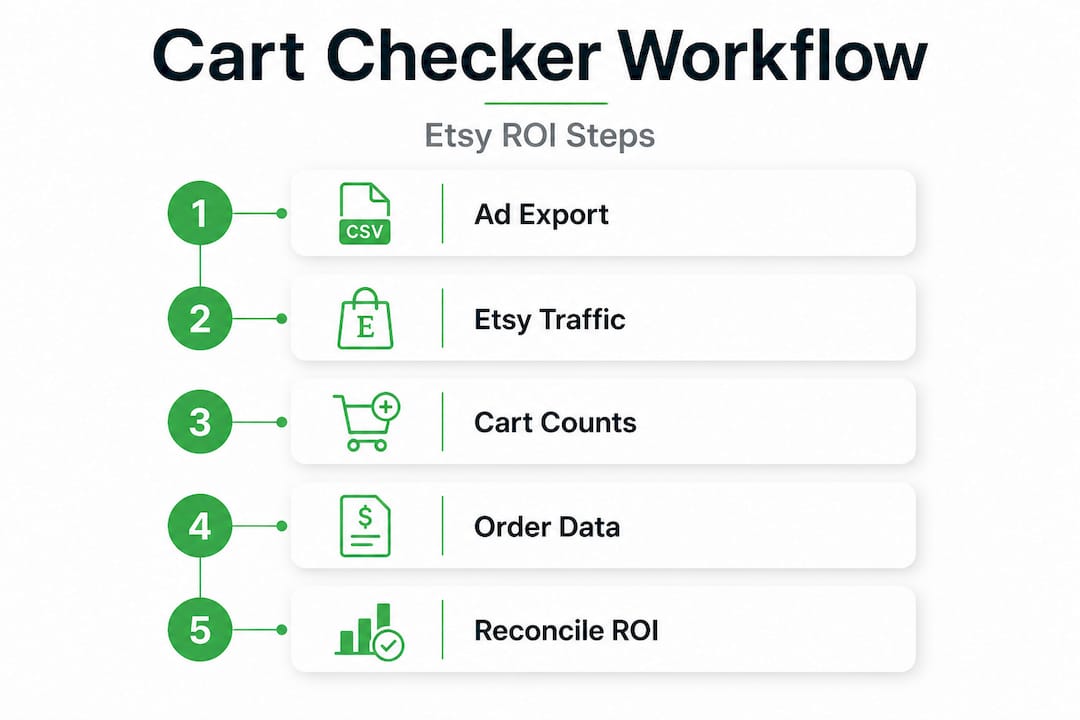
Step 1: Pull timestamped ad click data by listing
Start in your ad platform. Export a campaign performance report filtered by date range (minimum seven days, ideally fourteen). Ensure it includes the destination URL or UTM parameters tied to specific Etsy listing IDs. This gives you a record of which listings received paid traffic, when, and from which campaigns.
Step 2: Export Etsy listing-level traffic data
Go to your Etsy Seller Dashboard and download listing stats for the same date range. Match traffic volumes to the listing IDs you identified in Step 1. This helps you confirm that your ad clicks are actually registering as visits on the Etsy side. Large discrepancies between ad-reported clicks and Etsy-reported visits can indicate tracking issues, bot traffic, or mismatched URLs.
Step 3: Log in-cart counts before and after campaigns
Using the cart count checker tool, record the number of active in-cart instances for each advertised listing at the start and end of your campaign window. A listing with consistent ad traffic but zero in-cart movement is a signal that the listing is not resonating with the traffic being sent to it. High in-cart count relative to visits suggests strong intent and good listing-to-audience fit.
Step 4: Export order data and match to listing IDs
Download your Etsy order export for the same date range. Filter by listing ID to isolate purchases on the specific products you've been advertising. Record the total revenue, number of orders, and order timestamps.
Step 5: Reconcile ad clicks to orders within attribution window
In your spreadsheet, align ad click timestamps with order timestamps for each listing. Count orders that fall within your attribution window (typically seven days from click). This is your attributed conversion count. Divide total attributed revenue by total ad spend for those listings to get your working ROAS.
Step 6: Calculate net profitability against breakeven ROAS
This step is where most sellers stop short. ROAS alone does not tell you if you're profitable. As noted in profitability analysis, sellers should calculate breakeven ROAS tied to profit margin, since ROAS measures revenue and not profit. If your total costs (cost of goods, Etsy fees, ad spend) represent 60% of revenue, your breakeven ROAS is 1 divided by 0.40, which equals 2.5. Any campaign ROAS below 2.5 in this example is losing money, even if the top-line number looks positive.
Statistic callout: A seller with a 40% profit margin needs a minimum ROAS of 2.5 just to break even. Every dollar of ROAS below that threshold represents an actual financial loss, not a growth investment.
Pro Tip: Review the cart performance validation tips from IndiePixel's resource library before finalizing your breakeven calculation. Factoring in Etsy's 6.5% transaction fee plus payment processing can shift your breakeven ROAS by 0.3 to 0.5 points, which is significant at scale.
Interpreting results: What success and failure look like
After running your workflow for a cycle or two, you need to act on what the data reveals.
Not all ROAS numbers or in-cart trends mean the same thing. Interpreting your cart checker data requires looking at multiple signals together rather than treating any single metric as the deciding factor.
What healthy performance looks like:
- In-cart count increases align with periods of active ad spend
- Ad-attributed orders are consistent with or exceed the number predicted by in-cart movement
- Working ROAS stays above your calculated breakeven threshold across multiple periods
- CTR and add-to-cart rate both trend upward when you refine your creative or targeting
Red flags that signal wasted spend:
- High CTR combined with zero or minimal in-cart movement (traffic isn't converting to intent)
- In-cart counts increase but order volume stays flat (intent is present but something is blocking purchase, such as price, shipping cost, or listing quality)
- ROAS appears positive but falls below breakeven when fees and costs are factored in
- Attribution window mismatches causing you to over-count or under-count conversions
| Scenario | ROAS | In-Cart Movement | Action | |---|---|---|---| | Profitable, scaling candidate | Above breakeven | Consistent increase | Increase budget gradually | | Borderline, needs review | At breakeven | Moderate | Optimize listing and creative | | Unprofitable, high click waste | Below breakeven | Low or no movement | Pause and audit | | Intent gap (clicks but no carts) | N/A | Flat despite traffic | Review listing relevance |
A critical caution here: some sellers see a reported ROAS from Etsy's dashboard and assume they're profitable. But as the data makes clear, true ROAS can be misleading unless you reconstruct conversions yourself and evaluate net profitability after factoring in fees and margins, not just top-line revenue. Etsy's native reporting doesn't subtract your cost of goods or ad platform fees, so the number you see in the dashboard is almost always more optimistic than the reality.
"ROAS measures revenue, not profit. Sellers who scale on ROAS without verifying net margin often accelerate losses rather than growth."
Common mistakes to avoid when interpreting your results:
- Scaling on CTR alone: CTR tells you that your ad creative works. It doesn't confirm that your listing converts.
- Ignoring Etsy fees in ROAS math: Etsy's fee structure is layered, and it meaningfully reduces your effective margin.
- Treating one cycle of data as conclusive: Run the workflow for at least two to three campaign cycles before making major budget decisions. Seasonal variation, listing changes, and audience behavior all introduce variance.
If your break-even math for Etsy ads confirms you're above threshold, you have a data-validated basis for scaling. If not, the workflow has already saved you from pouring money into a campaign that looks functional but isn't.
Why most Etsy sellers miss out on reliable ad ROI
Step back from the technical details, and a clear pattern emerges from sellers who struggle with ad profitability versus those who manage it well.
The sellers who consistently get strong ad ROI are not necessarily running more sophisticated campaigns. They are simply more rigorous about closing the attribution loop before they scale. Most Etsy sellers trust the ROAS number in their ad platform or Etsy dashboard without verifying whether those reported conversions are real, attributed correctly, or profitable after costs. That gap between reported performance and actual performance is where ad budgets quietly disappear.
The uncomfortable reality is that running on unverified ROAS data is not neutral. It actively pushes you toward scaling campaigns that may be generating revenue but losing money on every transaction. The more you spend on a campaign with a below-breakeven ROAS, the more you lose. And because the dashboard number looks acceptable, you never trigger the review that would catch it.
Understanding realistic attribution windows is part of this discipline. A seven-day click attribution window is a default setting, not a law of physics. For some Etsy product categories, the purchase cycle is much shorter. For others, such as custom orders or higher-ticket items, buyers may take longer to decide. Assuming a one-size-fits-all window creates attribution errors that compound over time.
The decision loop that separates profitable sellers from the rest is simple: diagnose with clicks, validate intent with in-cart signals, and confirm profit with order-level reconciliation. None of these steps requires technical expertise. They require consistency and a willingness to look at complete data rather than convenient summaries.
IndiePixel's experience working with Etsy sellers reinforces this view: sellers who implement even a basic cart checker workflow catch underperforming campaigns weeks earlier than those relying on dashboard summaries. That early detection is the difference between a correctable course adjustment and significant wasted ad spend.
Streamline your Etsy cart checker with IndiePixel
Ready to put your workflow on autopilot? Here's how IndiePixel can help.
Building and maintaining a manual cart checker workflow is possible, but it's time-consuming and prone to human error in the reconciliation steps. IndiePixel is built specifically to handle these steps for Etsy sellers, bridging the tracking gap between your ad platforms and your actual sales data.
With IndiePixel's powerful cart checker tool, you get real-time in-cart tracking without manual snapshot logging. The platform syncs your ad attribution data, surfaces intent signals at the listing level, and feeds purchase data back to your ad platform via Conversion API. The result is a workflow that runs continuously, not just when you have time to pull CSVs. For sellers who are serious about advanced Etsy ad tracking, IndiePixel removes the guesswork and replaces it with reliable, actionable data at every stage of the funnel.
Frequently asked questions
What is a cart checker workflow for Etsy ads?
It's a process for tracking which ad clicks lead to add-to-cart actions and actual sales, using ad-driven attribution, in-cart movement, and order exports to give you clear profit validation beyond Etsy's dashboard.
How do I find add-to-cart data on Etsy?
You can access in-cart data by exporting listing reports from your Etsy Seller Dashboard or by using a dedicated workflow tool like the IndiePixel cart checker, which tracks in-cart signals continuously and at the listing level.
Can ROAS be trusted from Etsy's standard reports?
ROAS from Etsy is limited because it doesn't account for cost of goods, Etsy fees, or ad spend. True profitability requires matching ad-attributed sales and evaluating net profitability, not just top-line revenue.
What's the best way to boost Etsy ad ROI after tracking?
Prioritize scaling ads for listings with both high in-cart activity and a confirmed ROAS above your breakeven threshold, since those are the campaigns with validated intent and actual margin.
Why shouldn't I optimize Etsy ads on clicks alone?
Clicks don't guarantee profitability; you need to confirm shopper intent through add-to-cart signals and match purchases back to specific ad sources before you can reliably scale any campaign.